Summative Report

To begin the process, as a pair, we planned what microphones would be placed where and began to make the connections. As each cable was plugged in to the XLR splitter rack the corresponding channel strip was labelled with a sharpie and tape. The microphone used for the kick drum was a D112, the snare top and bottom SM57s, overheads were c1000s, the guitar was miked with a single SM57 and the vocalist used an SM58. SM57s are industry standard live microphones used for these particular applications because they are dynamic, have a high SPL, low bleed pickup and are hard to break. 57s also have a moulded frequency response with a natural low cut and some excitement in the high end making it suitable for instruments with a lot of harmonic qualities – i.e a snare drum/guitar. The D112 has a warm response in the low end of the frequency spectrum and the SM58 is brightened in the mid range making them both suitable for these applications. The C1000s are condensor microphones with a cardioid/hyper-cardioid polar pattern, with a frequency response tailored to provide brightened top end making them suitable choice for the role of over heads as more distance microphones are receiving and replicating, mostly, the top end of the sound. In retrospect, the process of setting up took a little too long but a cautious approach helped to ensure the connections were made correctly. After everything was connected I took charge of the main desk to ensure the signal was routing to the desk correctly. To achieve this my partner, Ikenna, stood on the stage and scratched the microphones whilst I boosted gain using the PFL setting on the Soundcraft Live 8 and analysed the LED meter to see if there was response. The only microphone to fail this test was the right C1000. Here began our first troubleshooting scenario. After following the signal path for this microphone all the way through and ensuring everything was cabled correctly and phantom power was provided the fault was placed on the microphone and the overhead scrapped and left out of the mix because time was against us. In an ideal world this problem would have been solved, but the severity of a lost overhead is less than that of a delayed gig. Once this process had taken place I quickly removed the most troublesome frequencies from the EQ via ringing out. I found trouble and got caught up on a frequency that I later found to be at around 800 Hz.  Once this initial setting up process had taken place we were able to get the band in to soundcheck. I went through the instrumentalists in order of drummer, bassist, guitarist and then vocalist checking each aspect of their instrument was set to a correct gain using PFL on the mixing desk. Once I had done this I could place the instruments in this mix and set levels. I noted that the vocalist was the quietest of the instruments and attempting to mix around this, this however created some difficulty because the vocalist was slightly unpracticed and didn’t use the microphone correctly and wouldn’t sing during the setting of levels, she would only speak. This lack of microphone knowledge hindered the mixing process because I was unable to adjust to a consistent level on vocal. However, I could have reduced the volume of the other instruments to improve the overall mix. During this process, I also failed to engage the EQ on some channel strips meaning my adjustments weren’t taking action. In the future, it would be invaluable to remember to do this. The bass guitar was DI’d through the amplifier during the verse chorus soundcheck the were a few loud cracks in the sound and bangs within the system. We then discovered that the bass guitar has a loose jack input, but also an XLR used to DI the bass was loose. Unable to fix the bass guitar at that point, we settled for fixing the DI connection by inserting a DI box and encouraged the bassist to be careful with his instrument. During this soundcheck, I attempted to feed in the auxiliary effects but they didn’t seem to be working. To fix this problem I checked the signal path from the point in which I knew it worked onwards, eventually finding that the effects had been unplugged and replaced with similarly labelled cables. To fix this I wired the auxiliary effects back in correctly, set gain and introduced them to the mix.


In reflection the aspects that needed greatest improvement during this assessment were organisation and cable management. To be successful in the live music industry, tasks must be managed with time efficiency and safety. The pressure of assessment found my partner and I being overly careful with processes we were both actually comfortable with, so keeping a cool head and mind set to task would help to create a more productive, successful process. Cable management was also very poor, I believe, due to the lack of prioritisation within our workflow. Whilst having to go back through already tidied cables to uncover problems hindered the tidying process, if this task had been approached as an ongoing responsibility, it would never have become unmanageable. Alongside this, my lack of knowledge of this particular desk found me making silly mistakes whilst mixing and removed my ability to be watching the band, as I had to spent a large amount of time locating things on the desk. In conclusion to improve upon my ability in this area I should be more practiced in live mixing scenarios and more organised in my approach to time allocation and time management.


Mixing with subgroups


Subgroups utilise a bus send to assign multiple channels to one subgroup channel control, usually a stereo channel with independent left and right faders. This allows us to control an assigned amount of instrument channels with one hand and with the multitude of things and engineer must take in to consideration with a mixing console, whilst listening to and watching the band, this may make things more manageable (especially in large band scenarios).


To engage subgroups, you must locate the in-out switches that connect the sends to the group channels, usually located just above the faders near mute, PFL and any other sends on the mixer. Once switched in it is usual practice to disengage the main mix sends to ensure that the is a single control for the mix. From this point, the audio is being sent directly to the group channel controls and these controls can be adjusted.

Insert VS. Auxiliary audio processing

Audio processing is an essential part of all almost all music. Bar the old acoustic guitar around the campfire, it’s used in almost every aspect of music to enhance the listening experience for the audience. Audio processing hardware, used with mixing desks, outside of the standard channel strip effects are utilised in one of two methods; Insert or Auxiliary effect. These two statements effectively describe the placement of the effect in the signal chain. Insert effects are applied directly to a channels signal pre-fader whereas auxiliary effects utilise a split signal returned to a different channel to allow signals to be blended together.  As to what effect should be placed where it varies hugely on the desired outcome of the effect but as a rule of thumb EQ’s and dynamics processors such as compressors, limiters and gates are the main uses for insert effects in a live scenario. Auxiliary sends may be used for effects like reverb, delays and harmonisers (essentially any effect you wish to have a wet/dry control for. Auxiliary’s also send and return busses to allow multiple channels to feed signal through effects.

Stage Setup: Cable routing

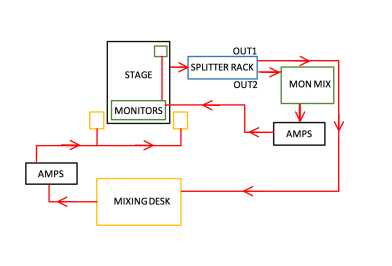
In a live performance scenario, having knowledge of cable routing is a necessity. The cable connections of a stage setup could be likened to the human nervous system, an assemblage of wires all interconnected to provide a pathway to a stable body and if a connection happens to be wrong, there can be severe consequences. The signal begins on stage at sound source (instruments) with the end goal being the speakers. Of course, during this journey there are multiple processes it must undergo.


The sound must first be converted to electrical signal, most commonly with the use of microphones, otherwise by direct injection. From here the sound will be processed via a mixing desk. However, in professional productions, sound is usually split between two mixing desks – One front of house and one side-stage for monitoring. This is done via a splitter-box rack. In scenarios where only a single desk is employed instruments would go directly in to a multicore and in to the desk, to be managed by auxiliary outputs, which feed in to separate amps. From the splitter rack, the signal run to the each mixing desks channel inputs. The signal can then be processed here to adjust dynamics, EQ and inserted or auxiliary effects. The main output of the front of house desk is fed to amplifiers and then to the speakers, usually via speakon cables. The main outputs of the monitor desk (which usually contain more outputs) are fed to amps and then to monitor speakers (wedges). The result is a separately managed mix, which allows more focus to be applied to each aspect of the production.


Screen Shot 2017-12-06 at 20.09.10.png

Mixing desk basics: Routing

Routing signals within a desk refers to the designated signal path running through the desk. All mixing desks have a preset route and routing options within the channel strip.


An input signal comes in to the mixing desk via the channel input, through an insert point and runs vertically downwards from there on out. In the specific example of the Soundcraft LIVE 8, as is present in The Sue Townsend theatre, the signal first runs through the a phase reverse switch and a gain pot and then to a 100Hz High pass/ Low cut filter. A filter used to removed unwanted low end from sounds. From this filter the signal then has the option to pass through an EQ consisting of four bands – A high shelf, two sweepable bells and a low shelf. The EQ is enabled via a switch. From this point the signal runs through 6 auxiliary sends, controlled by pots, which allows us to split the signal path and send it to a desired destination. This may be used to send to an effects rack, which would then return in to a new channel. Two of these sends are pre-fader, two switchable and two post fader – this differs between desks. The signal then runs through ‘MIX’ (sometimes L+R) and group switches, which are used to designate a signal to the main mix or group channels together. Most commonly used to collate instruments of the same type to a bus mix, to make adjustment more practical in a live scenario. From this point the signal proceeds to run through a mute button (function self explanatory). And then to mute groups. When a mute group is enabled on a channel strip, master mute control is to an button external of the channel strip, making it possible to mute multiple tracks at the same time. Just before the fader is a PFL button. This pulls the signal from the main mix allowing the engineer to monitor the signal before patching it through to the main mix.

Design a site like this with WordPress.com
Get started